
Use Out of Vehicle to perform Battery Tests on batteries if they are outside of the vehicle using test parameters determined through manual entry of battery parameters.
1.) Connect – Tester clamps to battery terminals
2.) Select – At the Main Menu, select Out of Vehicle Test
3.) Battery Test Setup – Edit the displayed battery information to match the information on the battery label

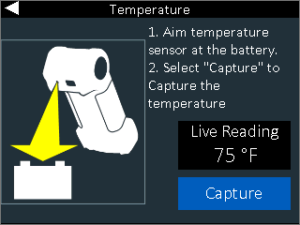
6.) Temperature – Hold sensor 6 to 12 inches over the battery and select capture to record the battery’s temperature
7.) Battery Test – The CPX-900 will start with a conductance test following by a 10A load applied for 60 seconds to check for reserve capacity via Midtronics’ Conductance Profiling technology

8.) Results – You will see the overall result displayed on the first page. Scrolling right on the keypad by pressing the right button takes you to the cranking decision, followed by the reserve health result. From the first screen you may choose to print to the onboard printer or send an email of the result, or selecting done will return you to the home screen.

